How to use Ghost
Install Ghost on your PC, activate your license, then use Monitor for restock alerts and Checkout for dry runs or live buys.
Getting started (order matters)
- Create an account, pick a plan, copy your license key from Account.
- Download Ghost, unzip somewhere permanent, open Ghost.exe.
- In Ghost → Settings: paste license → Activate, then paste Discord webhook → Test ping → Save.
- If you have Pro + Checkout → Profile: enter shipping, card, retailer password → Save profile.
- Monitor: add product links → Save monitor → Start monitor.
- Checkout (Pro + Checkout): paste one product URL, leave Dry run on, press Run to practice.
Status chips (top of every tab)
- Monitor idle / running — restock monitor state.
- Checkout dry-run / LIVE — whether Checkout will stop before Place Order, or attempt a real buy.
- License chip — plan / unlock status (e.g. checkout unlocked).
1. Settings — license and Discord
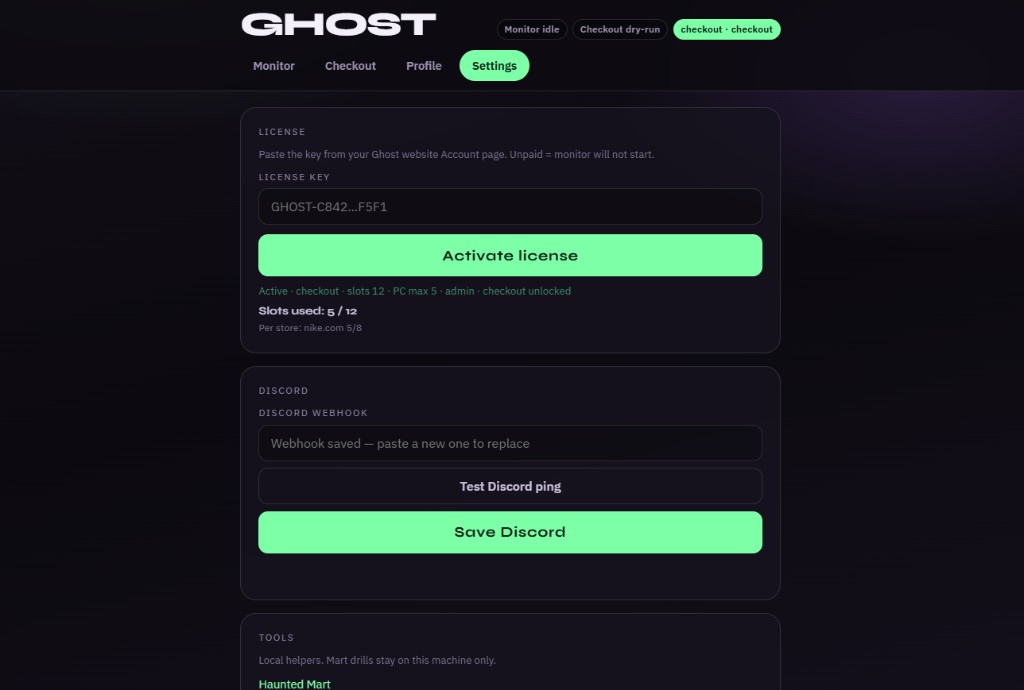
- License key — paste the key from your website Account page.
- Activate license — unlocks Monitor slots and, on Pro + Checkout, the Checkout + Profile tabs.
- Slots used — how many watch-list URLs you’re using vs your plan max (and per-store caps).
- Discord webhook — channel webhook URL for restock pings.
- Test Discord ping — sends a test message. Confirm it lands before you trust alerts.
- Save Discord — stores the webhook on this PC.
2. Profile — what Ghost types at checkout
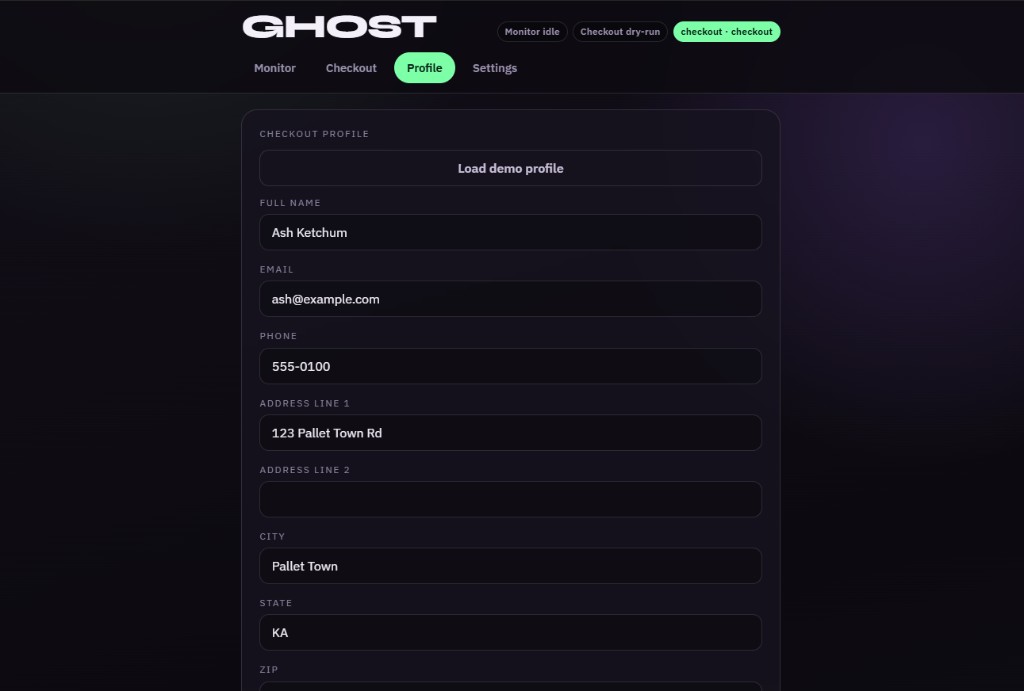
- Load demo profile — fills fake demo data so you can practice dry runs without your real info.
- Full name / Email / Phone — buyer contact. Email is also used for retailer sign-in assist when needed.
- Address line 1 / 2, City, State, ZIP, Country — ship-to address Ghost fills on checkout forms.
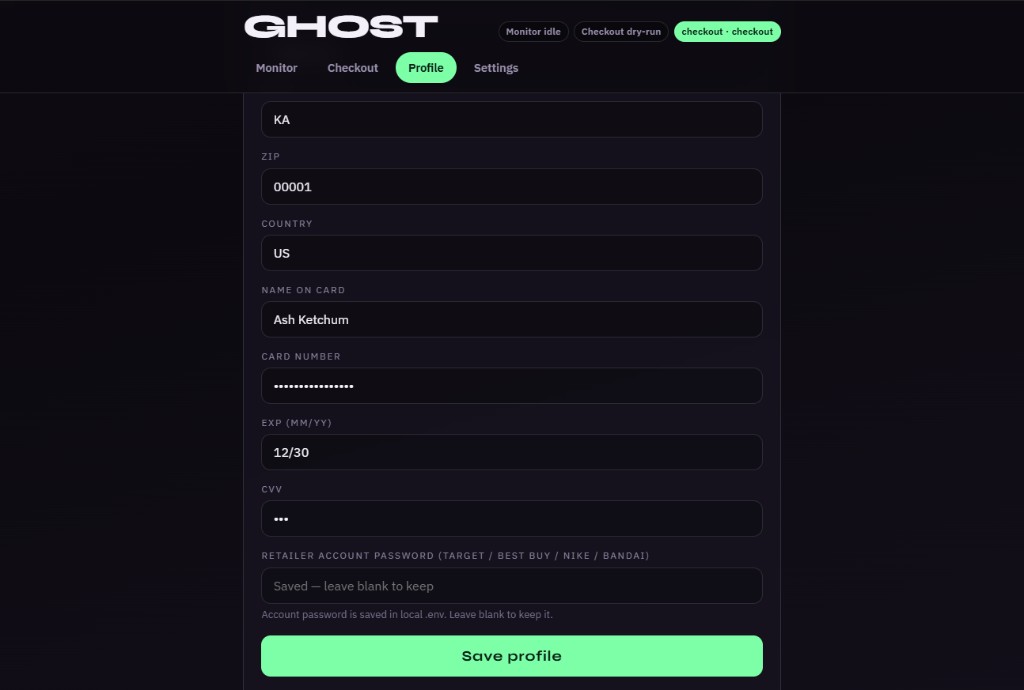
- Name on card / Card number / Exp / CVV — payment Ghost uses when Dry run is off (live place order). Card number and CVV stay masked after save.
- Retailer account password — Target / Best Buy / Nike / Bandai / Hot Topic password Ghost can submit on sign-in pages. Leave blank to keep a previously saved password.
- Save profile — writes everything to this PC.
- Open Nike login (further down on Profile) — opens clean Chrome for Nike Member sign-in when automation Chrome can’t log in. Close that window when done.
3. Monitor — restock alerts
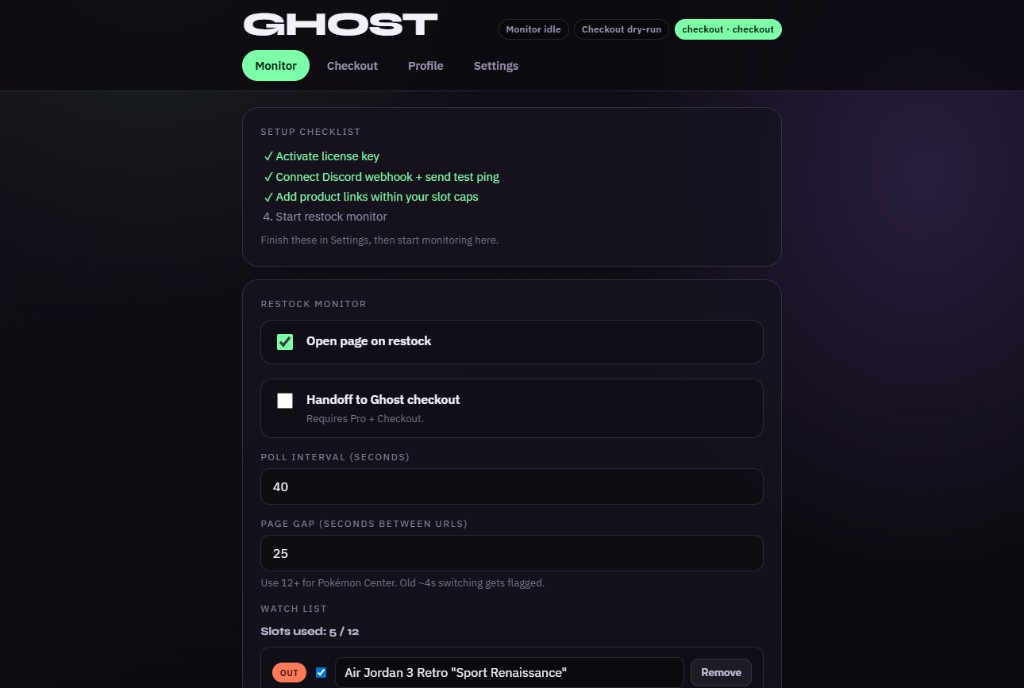
- Setup checklist — green checks when license, Discord, and links are ready. Last step completes when you Start monitor.
- Open page on restock — when a link goes in-stock, Ghost opens that product page in the monitor browser so you can act fast.
- Handoff to Ghost checkout — Pro + Checkout only. When a restock hits, Ghost can hand that URL to the checkout bot. Leave off until Profile + Dry run are set the way you want.
- Poll interval (seconds) — how long to wait between full sweeps of your watch list. Higher = gentler on stores.
- Page gap (seconds between URLs) — pause between each product URL in a sweep. Use 12+ for sensitive sites like Pokémon Center.
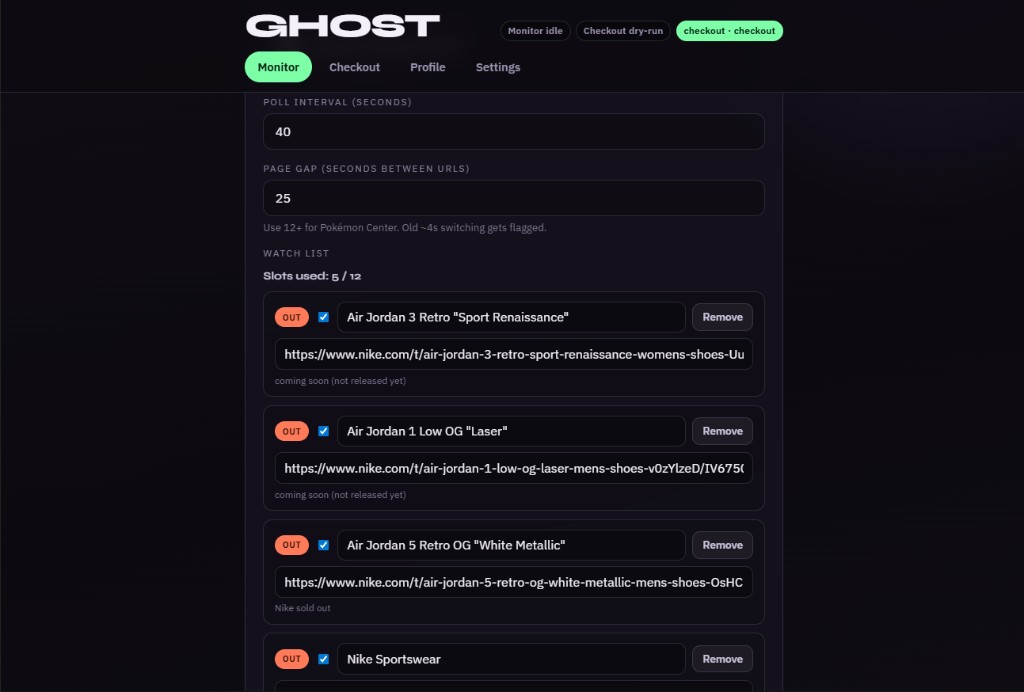
- Slots used — count against your plan (example: 5 / 12).
- OUT / IN badge — last known stock signal for that row.
- Checkbox — enable or pause that URL without deleting it.
- Label field — short name for Discord and the event list (e.g. shoe name).
- URL field — full product page link.
- Remove — delete the row.
- Status line under the URL — live probe detail (coming soon, sold out, soft block, etc.).
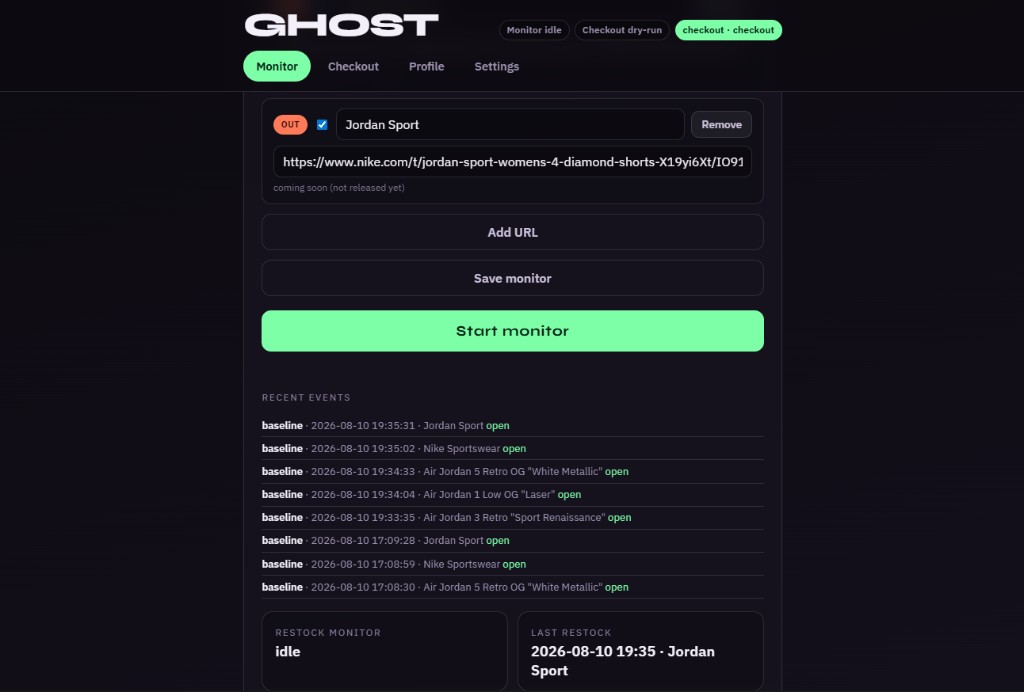
- Add URL — new empty row.
- Save monitor — stores list + poll settings on this PC.
- Start monitor — begins checking links and sending Discord alerts.
- Stop monitor — appears while running; ends the sweep loop.
- Recent events — history of restock / open events.
- Restock monitor / Last restock — idle vs running, and the last hit time + label.
4. Checkout — dry run and live buy
Before your first live buy (required)
- Fill Profile — shipping, card, and optional retailer password (assist fallback).
- Run once per store with Dry run on — Ghost opens Chromium (or system Chrome) for that store’s saved profile.
- Sign in manually in that Ghost browser until the account menu shows. Guest Add to cart is not enough on Target / Best Buy / Nike.
- Finish a successful dry run — Ghost reaches review / Place Order and stops without charging. Confirm qty, size, and fulfillment look right.
- Only then turn Dry run off for a live place order on the same PC, profile, and preferably the same network.
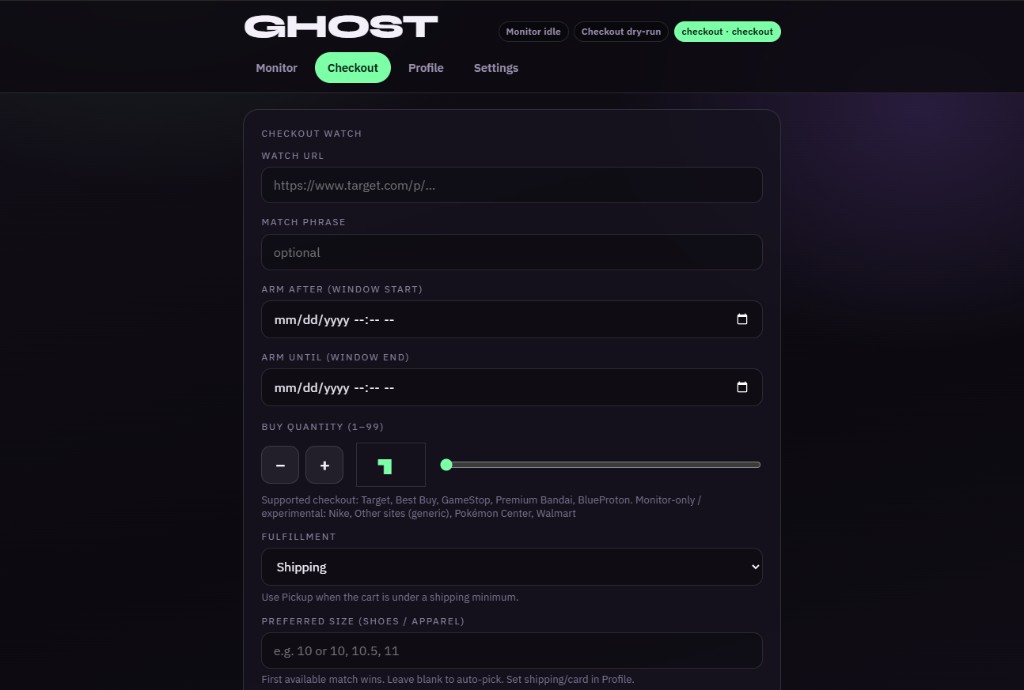
- Watch URL — the exact product page to buy (Target, Best Buy, GameStop, Bandai, Hot Topic, etc.).
- Match phrase — optional. On listing pages, Ghost looks for this text; leave blank on a direct product URL.
- Arm after / Arm until — optional time window. Ghost waits until Arm after, and stops after Arm until. Leave blank to run now.
- Buy quantity — how many units to try for (− / + / slider).
- Fulfillment — Auto, Shipping, Pickup, or Delivery. Use Pickup when the cart is under a shipping minimum.
- Preferred size — shoes/apparel sizes (e.g.
10or10, 10.5, 11). First match wins; blank = first in-stock size.
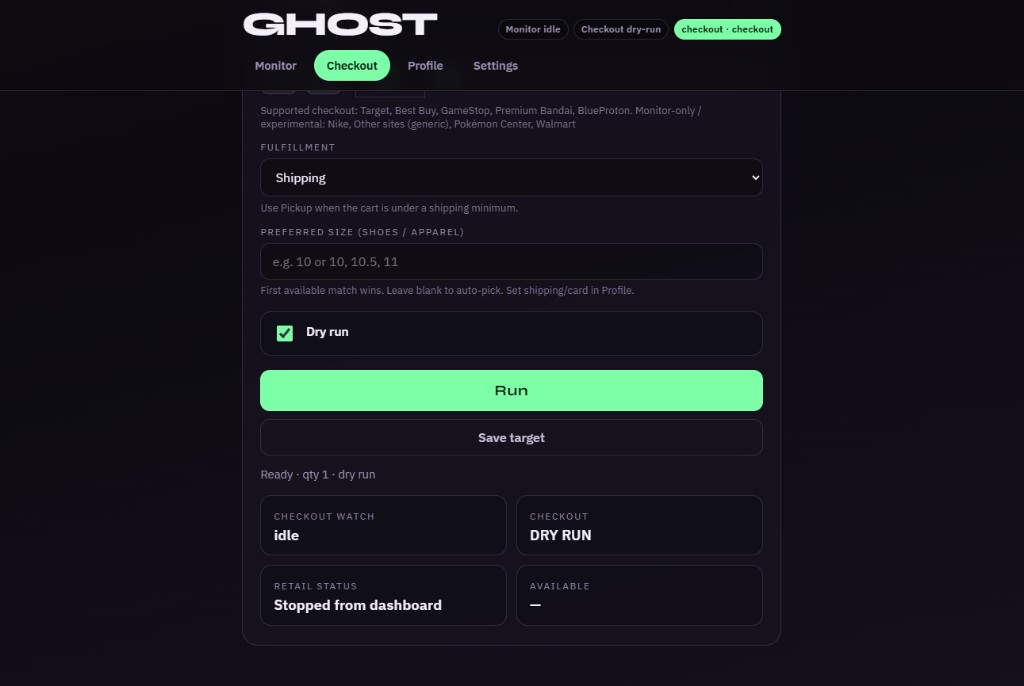
- Dry run (checked) — Ghost goes through add-to-cart and checkout forms, then stops before Place Order / Pay. No charge. Use this to learn and verify Profile data.
- Dry run unchecked → label becomes “Live place order” — Ghost may submit a real order. Only turn this off when you intend to buy. Status chips switch to warn you.
- Repeat purchase — live only. Re-runs checkout until Buy quantity is fully purchased when a store caps qty per order. Starts at 2 per order, steps down if blocked, then tries +1 after each success. Optional Max per order override. Dry run still does one checkout only.
- Run — start the checkout watch on the URL above.
- Save target — save URL, qty, fulfillment, size, and dry-run preference without starting.
- Stop — appears while a watch is running.
- Status boxes — Checkout watch state, DRY RUN vs LIVE, retail probe detail, availability.
Dry run vs Handoff (don’t mix them up)
- Dry run lives on the Checkout tab. It controls whether a checkout attempt can place a paid order.
- Handoff to Ghost checkout lives on the Monitor tab. It controls whether a restock alert can kick off the checkout bot automatically.
- Safe default: Dry run on, Handoff off, until you’ve completed a successful dry run on that store.
Verified checkout stores
Store tips (dry run)
- Sign into the store in Ghost Chrome first (Target: Hi, … in the header; Nike: your name). Guest Add to cart is not enough.
- Target: if the buy box shows N in cart, Ghost uses Buy now / Sign in to buy now.
- Best Buy: quantity is set on the cart (Item Quantity), not the product page — Ghost bumps it after Add to Cart.
- Nike: no qty on the product page — Ghost opens View Bag, uses the cart + / − steppers, then Checkout. Set Preferred size for shoes.
- Hot Topic: set Preferred size for apparel. Qty is on the product page and cart — Ghost sets PDP qty after size, then verifies on cart. Shipping Edit Address is normal.
- Premium Bandai: qty uses PDP +/− steppers; some items show a purchase limit. Use Repeat purchase (live) when you need more than one order’s worth.
- Save the retailer account password in Profile so Ghost can pick password sign-in if a method picker appears.
- A successful dry run stops before Place order. Most stores keep the cart so you can inspect the final page; Nike clears the bag after a successful dry run.
Rules
- Do not share license keys.
- Stay within slot and per-store limits.
- Alerts are best effort — stock can sell out before you click.
- Only download Ghost from this site while logged in.